
Transfer USDC with Data
USDC is a digital dollar backed 100% and is always redeemable 1:1 for US dollars. The stablecoin is issued by Circle on multiple blockchain platforms.
This guide will first explain how CCIP enables native USDC transfers when both the source and destination blockchains support Circle's Cross-Chain Transfer Protocol (CCTP).
Additionally, it will outline how CCIP also supports transferring Bridged USDC on blockchains that are not CCTP-enabled, allowing projects to later migrate to CCTP-enabled transfers if approved by Circle.
The hands-on tutorial at the end demonstrates how to use Chainlink CCIP to transfer USDC and arbitrary data from a smart contract on Ethereum Sepolia to Arbitrum Sepolia.
Architecture
Native USDC transfers through CCIP use Circle's Cross-Chain Transfer Protocol (CCTP) when both the source and destination chains support it. Both chains on this lane:
- Ethereum Sepolia,
- and Arbitrum Sepolia,
run CCTP-enabled USDC token pools, so this tutorial moves native USDC: burned on the source chain, minted on the destination.
For chains without native CCTP, Circle's Bridged USDC Standard lets teams deploy USDC early, with a seamless upgrade path to Native USDC later.
CCIP maintains a consistent API regardless of whether the transfer involves Native USDC or Bridged USDC:
- The sender interacts with the CCIP router to initiate a cross-chain transaction, just like any other token transfer. See the Transfer Tokens guide to learn more.
- The process uses the same onchain components including the Router, OnRamp, OffRamp, and Token Pool.
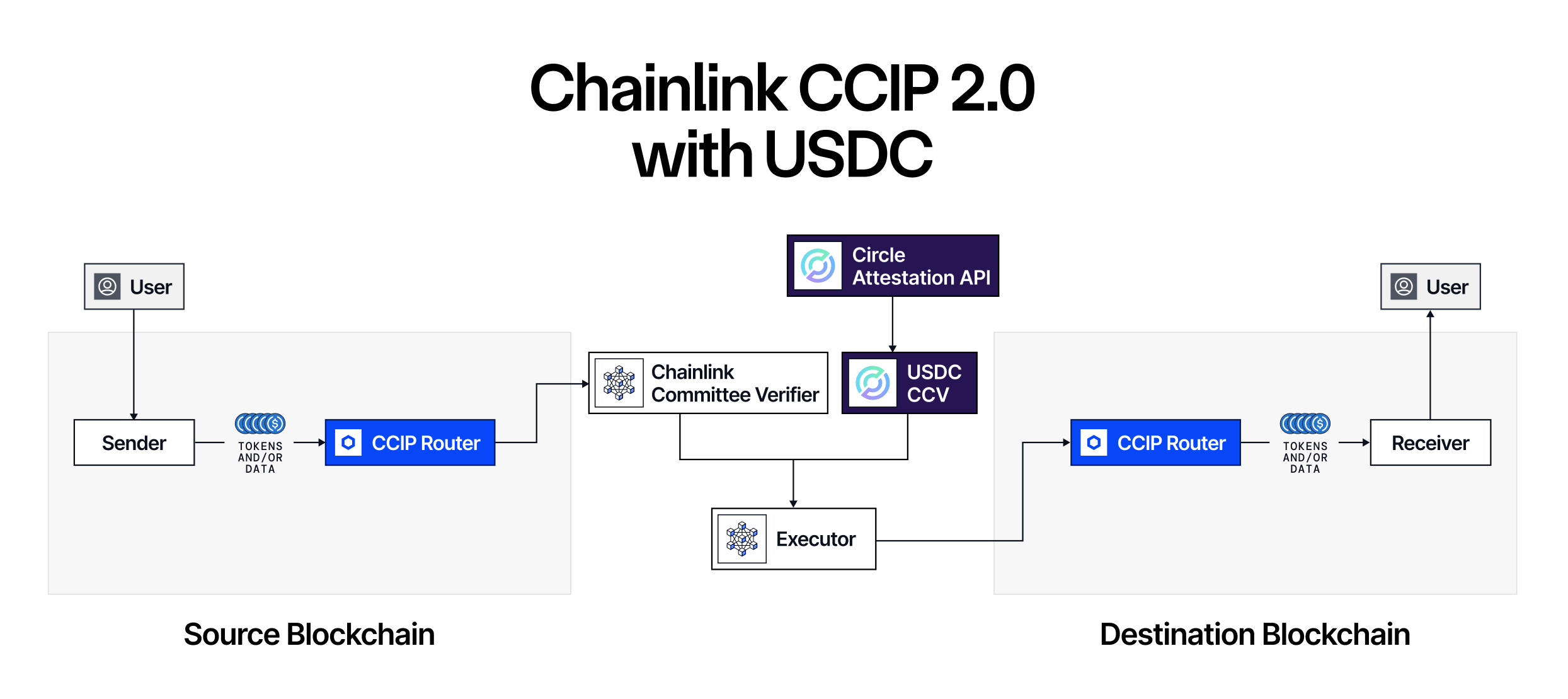
- Offchain, messages are verified by independent Cross-Chain Verifiers (CCVs). Every lane runs a default, decentralized Committee Verifier, and USDC transfers are additionally verified by a CCTP Verifier that checks Circle's own attestation for the burn.
- Once the required verifiers have attested, the message is delivered on the destination chain through the OffRamp, which verifies each attestation before the USDC token pool mints USDC using Circle's attestation.
- Execution on destination is permissionless, as in, anyone can submit an attested message for execution, and the Chainlink Executor does so by default.
- All lanes remain protected by the Risk Management Network, which can halt sends and executions on a lane through its cursing mechanism if a safety issue is detected.
The diagram below shows the native USDC flow: the USDC token pool burns tokens on the source chain via CCTP, the CCTP Verifier checks Circle's attestation for the burn, and the destination token pool mints USDC using that attestation once all required verifiers have signed off. To learn more about these components, read the CCIP architecture overview.
Before you begin
- You should understand how to write, compile, deploy, and fund a smart contract. Go through this tutorial to get started.
- Your account must have some
ETHandLINKtokens on Ethereum Sepolia, andETHon Arbitrum Sepolia for deploying the destination contracts and redeemingSTK. Learn how to Acquire testnet LINK. - Check the CCIP Directory if you want to configure a different set of source and destination chains/tokens.
- Acquire USDC tokens from the Circle faucet on Ethereum Sepolia.
Examine the code
Three contracts make this work, spread across two chains.
USDCSender sits on Ethereum Sepolia and starts the transfer. On Arbitrum Sepolia, USDCReceiver catches the incoming message and hands the USDC to USDCStaker, which mints a receipt token to whoever the sender nominated.
1 USDCSender (source chain)
-
Constructor. Three addresses are stored as immutables and never change afterwards: the CCIP router, LINK, and USDC.
-
Receiver allowlist.
s_receiversmaps a destination chain selector to the single receiver permitted on that chain. The owner manages entries throughsetReceiverForDestinationChainanddeleteReceiverForDestinationChain.
Sending to a chain with no entry reverts withNoReceiverOnDestinationChain, and a zero selector is rejected before anything else happens. -
The payload is a function call. Most CCIP examples put arbitrary bytes in
data.
Here it carries an encoded call instead, and that is the idea the tutorial rests on:USDCSender.soldata: abi.encodeWithSelector(IStaker.stake.selector, _beneficiary, _amount) -
Token amounts. An array with one entry holding USDC and the amount, since this contract only ever moves a single token.
-
Fee quoting.
getFeeis a helper on this contract, not the router's own function.
It assembles the identicalEVM2AnyMessagethatsendMessagewill build, then forwards it to the router, so both calls price exactly the same message. The only gap is fee drift between blocks, sincesendMessagere-quotes when it runs. -
Sending, and where the tokens come from.
sendMessageis restricted to the owner, which is the account that deployed the contract. It pulls USDC frommsg.senderusingtransferFrom, and pulls the fee token the same way when you pay in an ERC-20.
You approve from your own wallet, so there is no need to move USDC into the sender contract beforehand. A zero amount reverts withAmountIsZero. -
extraArgsarrive pre built and encoded. The contract accepts encoded bytes and passes them through untouched. Keeping that encoding offchain is what lets one contract serve both pre-2.0 and 2.0 lanes without a redeploy. -
Withdrawals.
withdrawNativeToken,withdrawLinkToken, andwithdrawUsdcTokenlet the owner sweep out anything left behind, each reverting withNothingToWithdrawon an empty balance.


View the complete contract on GitHub.
2 USDCStaker (destination chain)
-
It is an ERC-20 in its own right. Staking mints a receipt token named
Simple Staker, with the symbolSTK. -
Decimals follow USDC. The constructor reads
decimals()off the USDC contract and mirrors it, soSTKalso uses 6 decimals and balances line up 1:1 with the USDC backing them. A zero reverts withInvalidNumberOfDecimals. -
stake(beneficiary, amount). Pulls USDC from the caller, then mints an equal amount ofSTKto the beneficiary. Those are deliberately two different addresses. Guards cover a zero beneficiary and a zero amount. -
redeem(). Burns the caller's entireSTKbalance and sends back the same amount of USDC. Since it works offmsg.sender, only the beneficiary can redeem their own position.
View the complete contract on GitHub.
3 USDCReceiver (destination chain)
-
Constructor. Extends
CCIPReceiverwith the router address and stores USDC and the staker as immutables. It also grants the staker an unlimited USDC allowance up front, which is why staking needs no per message approval later on. -
Sender allowlist. The mirror image of the sender's list.
s_sendersmaps a source chain selector to the one sender allowed to reach this contract. A message from an unlisted chain, or from the wrong address on a listed one, reverts withWrongSenderForSourceChain. -
Finality policy.
setAllowedFinalityConfigstores abytes4per source chain, andgetCCVsAndFinalityConfigis what the OffRamp reads back when a message lands. Left atbytes4(0), the contract accepts fully finalized messages only. A non-zero value opts into faster delivery by declaring the shallowest block depth this contract is willing to trust. The configure step later sets it to 32. -
Failures are caught, not thrown.
ccipReceivewraps the real work in atryblock:USDCReceiver.soltry this.processMessage(any2EvmMessage) {} catch (bytes memory err) { s_failedMessages.set(any2EvmMessage.messageId, uint256(ErrorCode.FAILED)); s_messageContents[any2EvmMessage.messageId] = any2EvmMessage; emit MessageFailed(any2EvmMessage.messageId, err); return; }Swallowing the revert keeps the CCIP execution itself successful, so the tokens settle in this contract rather than being stranded mid transfer.
processMessageis external purely so thetryis possible at all, andonlySelfkeeps anyone else from calling it. -
Processing a message.
_ccipReceivefirst checks that the arriving token matches the USDC the contract was deployed against, rejecting anything else withWrongReceivedToken. It then decodes the beneficiary from the payload and callsstake()withdestTokenAmounts[0].amount, the amount that actually landed, rather than the figure the sender encoded. That distinction matters, because CCTP can take a fee on the destination side, so only the arriving balance is reliable. -
Inspecting and recovering failures.
getFailedMessagesreturns a paginated view backed by anEnumerableMap.retryFailedMessagelets the owner mark a messageRESOLVED, which blocks replays, and move the tokens to an address of their choosing. It reads the token out of the stored message rather than the immutable, so recovery still works for something unexpected. Neither runs on the happy path, but they are what makes a failed delivery recoverable.
View the complete contract on GitHub.
Tutorial
Let's get started! Choose your preferred development environment below.
Foundry
Best for Solidity-native workflows that prefer a modular, powerful scripting framework.
1 Bootstrap a new Foundry project
Clone the template for a smoother setup.
- Clone the CCIP 2.0 template repository, and open a terminal inside the project directory:

git clone https://github.com/smartcontractkit/docs-ccip.git && cd docs-ccip
- If you don't already have a Foundry keystore, create one with
cast. Here,your_keystore_nameis the alias you assign to this entry, and Foundry will prompt you for the private key itself along with a password to encrypt it:
cast wallet import your_keystore_name --interactive
- Install dependencies:
npm install
- Create a
.envfile by copying the example file, and fill in your values:
cp .env.example .env
Set KEYSTORE_NAME to the entry you just created, and provide RPC endpoints for both chains on this lane:
# Keystore name
KEYSTORE_NAME=your_keystore_name

# RPC URLs
ETHEREUM_SEPOLIA_RPC_URL=
ARBITRUM_SEPOLIA_RPC_URL=

# Etherscan API key (not used in this tutorial)
ETHERSCAN_API_KEY=
- Load the environment variables:
source .env
- Compile the contracts:
forge build
2 Deploy your contracts
Deploy.s.sol handles all three deployments across both chains in a single run:
- Deploy
USDCSenderon Ethereum Sepolia (source). - Deploy
USDCStakeron Arbitrum Sepolia (destination). - Deploy
USDCReceiveron Arbitrum Sepolia (destination), wired to the staker it just deployed. - Print all three addresses in the terminal.
To run the script, use the following command:
SOURCE_CHAIN=ETHEREUM_SEPOLIA DEST_CHAIN=ARBITRUM_SEPOLIA \
forge script foundry/scripts/tutorials/transfer-usdc-with-data/deploy/Deploy.s.sol:Deploy \
--account $KEYSTORE_NAME \
--broadcast -vv
Your terminal should look something like this:
========================================
🚀 Deploy USDC Transfer-with-Data Contracts
========================================
Source Chain:      Ethereum Sepolia
Destination Chain: Arbitrum Sepolia
========================================


[Step 1] Deploying USDCSender on Ethereum Sepolia
  router:    0x0BF3dE8c5D3e8A2B34D2BEeB17ABfCeBaf363A59
  link:      0x779877A7B0D9E8603169DdbD7836e478b4624789
  usdc:      0x1c7D4B196Cb0C7B01d743Fbc6116a902379C7238
Contract deployed at: 0x7A9c4E1b2D3f5061A2b3C4d5E6f708192a3B4c5D
https://sepolia.etherscan.io/address/0x7A9c4E1b2D3f5061A2b3C4d5E6f708192a3B4c5D

========================================
✅ USDCSender deployed on Ethereum Sepolia!
========================================


[Step 2] Deploying USDCStaker on Arbitrum Sepolia
  usdc:      0x75faf114eafb1BDbe2F0316DF893fd58CE46AA4d
Contract deployed at: 0x2F8b1D4e5A6c7089B1c2D3e4F5a6B7c8D9e0F1a2
https://sepolia.arbiscan.io/address/0x2F8b1D4e5A6c7089B1c2D3e4F5a6B7c8D9e0F1a2


[Step 3] Deploying USDCReceiver on Arbitrum Sepolia
  router:    0x2a9C5afB0d0e4BAb2BCdaE109EC4b0c4Be15a165
  usdc:      0x75faf114eafb1BDbe2F0316DF893fd58CE46AA4d
  staker:    0x2F8b1D4e5A6c7089B1c2D3e4F5a6B7c8D9e0F1a2
Contract deployed at: 0x9B0c1D2e3F4a5B6c7D8e9F0a1B2c3D4e5F6a7B8c
https://sepolia.arbiscan.io/address/0x9B0c1D2e3F4a5B6c7D8e9F0a1B2c3D4e5F6a7B8c

========================================
✅ USDCStaker + USDCReceiver deployed on Arbitrum Sepolia!
========================================

========================================
✅ All Deployments Complete!
========================================
Source Chain:      Ethereum Sepolia
USDCSender:        0x7A9c4E1b2D3f5061A2b3C4d5E6f708192a3B4c5D
https://sepolia.etherscan.io/address/0x7A9c4E1b2D3f5061A2b3C4d5E6f708192a3B4c5D

Destination Chain: Arbitrum Sepolia
USDCStaker:        0x2F8b1D4e5A6c7089B1c2D3e4F5a6B7c8D9e0F1a2
https://sepolia.arbiscan.io/address/0x2F8b1D4e5A6c7089B1c2D3e4F5a6B7c8D9e0F1a2
USDCReceiver:      0x9B0c1D2e3F4a5B6c7D8e9F0a1B2c3D4e5F6a7B8c
https://sepolia.arbiscan.io/address/0x9B0c1D2e3F4a5B6c7D8e9F0a1B2c3D4e5F6a7B8c

Run this command to set all environment variables:
export ETHEREUM_SEPOLIA_CONTRACT=0x7A9c4E1b2D3f5061A2b3C4d5E6f708192a3B4c5D && export ARBITRUM_SEPOLIA_STAKER_CONTRACT=0x2F8b1D4e5A6c7089B1c2D3e4F5a6B7c8D9e0F1a2 && export ARBITRUM_SEPOLIA_CONTRACT=0x9B0c1D2e3F4a5B6c7D8e9F0a1B2c3D4e5F6a7B8c
========================================
- Export the three addresses the remaining steps rely on:
export ETHEREUM_SEPOLIA_CONTRACT=<usdc-sender-address> && export ARBITRUM_SEPOLIA_STAKER_CONTRACT=<usdc-staker-address> && export ARBITRUM_SEPOLIA_CONTRACT=<usdc-receiver-address>
ARBITRUM_SEPOLIA_STAKER_CONTRACT is used later when you redeem STK for USDC.
View the complete script on GitHub.
3 Configure allowlists and finality
The sender and receiver start out refusing this lane. Configure.s.sol introduces them to each other and sets the finality policy in one run:
- On Ethereum Sepolia, call
setReceiverForDestinationChainonUSDCSenderto allowlist the Arbitrum Sepolia receiver. - On Arbitrum Sepolia, call
setSenderForSourceChainonUSDCReceiverto allowlist the Ethereum Sepolia sender. - On Arbitrum Sepolia, call
setAllowedFinalityConfigso the receiver will accept custom finality.
Finality configuration
ALLOWED_FINALITY_CONFIG=BLOCK_DEPTH paired with ALLOWED_BLOCK_DEPTH=32 sets the receiver's minimum accepted block depth to 32. Omit ALLOWED_FINALITY_CONFIG to leave the receiver at the default: full finality only.
When the pool exposes a minimum, the script checks your value against it before broadcasting, so a depth the lane will not honor fails immediately instead of much later, as a rejected message.
SOURCE_CHAIN=ETHEREUM_SEPOLIA DEST_CHAIN=ARBITRUM_SEPOLIA \
ALLOWED_FINALITY_CONFIG=BLOCK_DEPTH \
ALLOWED_BLOCK_DEPTH=32 \
forge script foundry/scripts/tutorials/transfer-usdc-with-data/configure/Configure.s.sol:Configure \
--account $KEYSTORE_NAME \
--broadcast -vv
Your terminal should look something like this:
========================================
⚙️ Configure USDC Transfer-with-Data Contracts
========================================
Source Chain:       Ethereum Sepolia
USDCSender:         0x7A9c4E1b2D3f5061A2b3C4d5E6f708192a3B4c5D
Destination Chain:  Arbitrum Sepolia
USDCReceiver:       0x9B0c1D2e3F4a5B6c7D8e9F0a1B2c3D4e5F6a7B8c
========================================


[Step 1] Setting receiver on USDCSender (Ethereum Sepolia)
  Destination chain: Arbitrum Sepolia (selector: 3478487238524512106)
  Receiver address: 0x9B0c1D2e3F4a5B6c7D8e9F0a1B2c3D4e5F6a7B8c
  ✅ Receiver set for destination chain

========================================
✅ Configuration Complete on Ethereum Sepolia!
========================================


[Step 2] Configuring USDCReceiver (Arbitrum Sepolia)
  Source chain: Ethereum Sepolia (selector: 16015286601757825753)
  Sender address: 0x7A9c4E1b2D3f5061A2b3C4d5E6f708192a3B4c5D
  ✅ Sender set for source chain
  Setting allowed finality config to 0x00000020 (BLOCK_DEPTH=32)...
  ✅ Allowed finality config set to 0x00000020 (BLOCK_DEPTH=32) for Ethereum Sepolia

========================================
✅ Configuration Complete on Arbitrum Sepolia!
========================================

========================================
✅ All Configurations Complete!
========================================
USDCSender on Ethereum Sepolia is configured to send USDC to Arbitrum Sepolia
USDCReceiver on Arbitrum Sepolia is configured to accept messages from Ethereum Sepolia

** Next Step: Send USDC with Data **
========================================
The script closes by printing ready-to-run send commands for both LINK and native fees. The next step covers the LINK version.
Configure.s.solView the complete script on GitHub.
4 Send USDC with data
SendMessage.s.sol carries out the transfer end to end:
- Builds
extraArgsoffchain throughExtraArgsHelper.buildExtraArgs, which reads the USDC token pool's allowed finality config, falling back to arouter.getFeeprobe when the pool exposes none, then encodes V2 or V3 to match the lane. - Quotes the CCIP fee through the sender's
getFee. - Approves
USDCSenderto pull USDC and LINK from your wallet. - Sends the message, then prints the message ID and a CCIP Explorer link.
Beneficiary
BENEFICIARY is the address that ends up holding the STK tokens on Arbitrum Sepolia. For this tutorial, use the same wallet that broadcasts the send transaction so the same keystore can redeem later.
Get that address from your Foundry keystore:
cast wallet address --account $KEYSTORE_NAME
Use the printed address in the BENEFICIARY=<your-wallet-address> placeholder in the send command below.
You can set
BENEFICIARYto a different address, but only that address can later redeem theSTKtokens for USDC. So only use an address whose private key you control, and make sure it has the native gas token on Arbitrum Sepolia to cover gas for the redeem step.
Faster Than Finality (block depth)
The BLOCK_DEPTH variable controls the source-chain finality requested for CCIP execution:
- Omit it, or set
BLOCK_DEPTH=DEFAULTorBLOCK_DEPTH=0, to request full finality. - Set
BLOCK_DEPTH=32to request faster delivery. This matches theALLOWED_BLOCK_DEPTHyou configured on the receiver in the previous step, so the two ends agree.
SOURCE_CHAIN=ETHEREUM_SEPOLIA DEST_CHAIN=ARBITRUM_SEPOLIA \
FEE_TOKEN=LINK \
BENEFICIARY=<your-wallet-address> \
USDC_AMOUNT=1230000 \
BLOCK_DEPTH=32 \
forge script foundry/scripts/tutorials/transfer-usdc-with-data/interact/SendMessage.s.sol:SendMessage \
--account $KEYSTORE_NAME \
--broadcast -vv
USDC_AMOUNT is denominated in raw units, so 1230000 is 1.23 USDC at 6 decimals. That is not the script default, which is 1000000.
Your terminal should look something like this:
========================================
📡 Send USDC with Data via CCIP - Pay with LINK
========================================
Source Chain:      Ethereum Sepolia
Destination Chain: Arbitrum Sepolia
USDCSender:        0x7A9c4E1b2D3f5061A2b3C4d5E6f708192a3B4c5D
USDCReceiver:      0x9B0c1D2e3F4a5B6c7D8e9F0a1B2c3D4e5F6a7B8c
Beneficiary:       0x5C6d7E8f9A0b1C2d3E4f5A6b7C8d9E0f1A2b3C4d
USDC Amount:       1230000 (raw units)
Fee Token:         LINK
========================================


[Pre-validation] Detecting lane version and building extraArgs...
Gas limit: 1000000
Token pool ALLOWED_FINALITY_CONFIG: undefined (pool has no constraint or pre-v2.0 pool).
V3 extraArgs accepted by lane (v2.0+ lane, no pool constraint).
Receiver contract ALLOWED_FINALITY_CONFIG: 0x00000020 (BLOCK_DEPTH: 32 block(s))
✅ Using V3 extraArgs with FTF (gasLimit=1000000, finalityConfig=0x00000020 (BLOCK_DEPTH: 32 block(s))).

Estimated CCIP fee: 21374829384756123
Extra args: 0xa69dd4aa000f42400000002000000000000000

[Step 1] Approving USDCSender to spend USDC...
  USDC amount: 1230000
✅ Approved

[Step 2] Approving USDCSender to spend fee token for CCIP fees...
  Fee: 21374829384756123
✅ Approved

[Step 3] Sending USDC with data via CCIP (ERC-20 fee)...

========================================
✅ CCIP Message Sent Successfully!
========================================
CCIP Message ID: 0x8f2a4b6c1d3e5f708192a3b4c5d6e7f8091a2b3c4d5e6f708192a3b4c5d6e7f8
CCIP Explorer:
https://ccip.chain.link/#/side-drawer/msg/0x8f2a4b6c1d3e5f708192a3b4c5d6e7f8091a2b3c4d5e6f708192a3b4c5d6e7f8

Once confirmed (status: Success), beneficiary 0x5C6d7E8f9A0b1C2d3E4f5A6b7C8d9E0f1A2b3C4d
will have STK tokens on Arbitrum Sepolia redeemable for USDC via the USDCStaker contract.
========================================
The next step redeems the STK tokens after the message settles and staking succeeds.
Environment variables
| Description | ||
|---|---|---|
KEYSTORE_NAME | Foundry keystore alias created with cast wallet import | |
{CHAIN}_RPC_URL | RPC endpoint per chain, for example ETHEREUM_SEPOLIA_RPC_URL | |
SOURCE_CHAIN | Source chain identifier, ETHEREUM_SEPOLIA on this lane | |
DEST_CHAIN | Destination chain identifier, ARBITRUM_SEPOLIA on this lane | |
CHAIN | Chain identifier for destination-chain scripts, ARBITRUM_SEPOLIA on this lane | |
{CHAIN}_CONTRACT | Deployed contract on that chain: the sender on the source, the receiver on the destination | |
{CHAIN}_STAKER_CONTRACT | Deployed USDCStaker contract on the destination, for example ARBITRUM_SEPOLIA_STAKER_CONTRACT | |
FEE_TOKEN | LINK or NATIVE | NATIVE |
FEE_TOKEN_ADDRESS | Any CCIP-supported fee token on the lane. Takes priority over FEE_TOKEN | |
BENEFICIARY | Address that receives the STK tokens on the destination chain | |
USDC_AMOUNT | USDC to send, in raw units at 6 decimals | 1000000 |
GAS_LIMIT | Gas made available to the receiver on the destination chain | 1000000 |
BLOCK_DEPTH | Block depth requested on send. DEFAULT or 0 waits for full finality | DEFAULT |
WAIT_FOR_FINALITY | Requests full finality explicitly. Equivalent to leaving BLOCK_DEPTH unset | false |
ALLOWED_FINALITY_CONFIG | Finality modes the receiver will accept, set during configuration | |
ALLOWED_BLOCK_DEPTH | Shallowest block depth the receiver accepts. Required when ALLOWED_FINALITY_CONFIG uses it |
View the complete script on GitHub.
5 Redeem STK for USDC
After the CCIP Explorer shows that the message has been successfully processed and the beneficiary has received STK, the beneficiary can redeem those tokens on Arbitrum Sepolia.
Redeem.s.sol checks the caller's STK balance, calls redeem() on USDCStaker, burns the caller's full STK balance, and transfers the same amount of USDC back to the caller.
CHAIN=ARBITRUM_SEPOLIA \
forge script foundry/scripts/tutorials/transfer-usdc-with-data/interact/Redeem.s.sol:Redeem \
--account $KEYSTORE_NAME \
--broadcast -vv
Your terminal should look something like this:
========================================
💰 Redeem STK Tokens for USDC
========================================
Chain:       Arbitrum Sepolia
USDCStaker:  0x2F8b1D4e5A6c7089B1c2D3e4F5a6B7c8D9e0F1a2
========================================

STK balance:  1230000
USDC to receive: 1230000 (raw units)

[Step 1] Calling redeem() on USDCStaker...
  This burns your entire STK balance and returns the equivalent USDC.

========================================
✅ Redeem Complete!
========================================
USDC received: 1230000 (raw units)
USDC balance:  1230000 (raw units)
USDCStaker:    0x2F8b1D4e5A6c7089B1c2D3e4F5a6B7c8D9e0F1a2
https://sepolia.arbiscan.io/address/0x2F8b1D4e5A6c7089B1c2D3e4F5a6B7c8D9e0F1a2
========================================
Your final USDC balance may be higher if the wallet already held USDC before redeeming.
Redeem.s.solView the complete script on GitHub.
Hardhat
Best for developers who want a mature, TypeScript-based smart contract development framework.
1 Bootstrap a new Hardhat project
Clone the template (contains both Hardhat and Foundry code) for a smoother setup.
- Clone the CCIP 2.0 template repository, and open a terminal inside the project directory:
git clone https://github.com/smartcontractkit/docs-ccip.git && cd docs-ccip
- Copy the example environment file and fill in your values:
cp .env.example .env
Set KEYSTORE_NAME to the keystore alias you will create later in this section, and provide RPC endpoints for both chains on this lane:
# Keystore name
KEYSTORE_NAME=your_keystore_name

# RPC URLs
ETHEREUM_SEPOLIA_RPC_URL=
ARBITRUM_SEPOLIA_RPC_URL=

# Etherscan API key (not used in this tutorial)
ETHERSCAN_API_KEY=
- Install dependencies and compile:
npm install && npx hardhat compile
- Load the environment variables:
source .env
- Create a Hardhat keystore entry for your private key. Use the same name as
KEYSTORE_NAMEin your.envfile. Hardhat will prompt you to enter the private key and a password to encrypt it:
npx hardhat keystore set your_keystore_name
2 Deploy your contracts
deploy.ts handles all three deployments across both chains in a single run:
- Deploy
USDCSenderon Ethereum Sepolia (source). - Deploy
USDCStakeron Arbitrum Sepolia (destination). - Deploy
USDCReceiveron Arbitrum Sepolia (destination), wired to the staker it just deployed. - Print all three addresses in the terminal.
To run the script, use the following command:
SOURCE_CHAIN=ETHEREUM_SEPOLIA DEST_CHAIN=ARBITRUM_SEPOLIA \
npx hardhat run hardhat/scripts/tutorials/transfer-usdc-with-data/deploy/deploy.ts
Your terminal should look something like this:
========================================
🚀 Deploy USDC Transfer-with-Data Contracts
========================================
Source Chain:      Ethereum Sepolia
Destination Chain: Arbitrum Sepolia
========================================


[Step 1] Deploying USDCSender on Ethereum Sepolia
  router: 0x0BF3dE8c5D3e8A2B34D2BEeB17ABfCeBaf363A59
  link:   0x779877A7B0D9E8603169DdbD7836e478b4624789
  usdc:   0x1c7D4B196Cb0C7B01d743Fbc6116a902379C7238
Contract deployed at: 0x7A9c4E1b2D3f5061A2b3C4d5E6f708192a3B4c5D
https://sepolia.etherscan.io/address/0x7A9c4E1b2D3f5061A2b3C4d5E6f708192a3B4c5D

========================================
✅ USDCSender deployed on Ethereum Sepolia!
========================================


[Step 2] Deploying USDCStaker on Arbitrum Sepolia
  usdc:   0x75faf114eafb1BDbe2F0316DF893fd58CE46AA4d
Contract deployed at: 0x2F8b1D4e5A6c7089B1c2D3e4F5a6B7c8D9e0F1a2
https://sepolia.arbiscan.io/address/0x2F8b1D4e5A6c7089B1c2D3e4F5a6B7c8D9e0F1a2

[Step 3] Deploying USDCReceiver on Arbitrum Sepolia
  router: 0x2a9C5afB0d0e4BAb2BCdaE109EC4b0c4Be15a165
  usdc:   0x75faf114eafb1BDbe2F0316DF893fd58CE46AA4d
  staker: 0x2F8b1D4e5A6c7089B1c2D3e4F5a6B7c8D9e0F1a2
Contract deployed at: 0x9B0c1D2e3F4a5B6c7D8e9F0a1B2c3D4e5F6a7B8c
https://sepolia.arbiscan.io/address/0x9B0c1D2e3F4a5B6c7D8e9F0a1B2c3D4e5F6a7B8c

========================================
✅ USDCStaker + USDCReceiver deployed on Arbitrum Sepolia!
========================================

========================================
✅ All Deployments Complete!
========================================
Source Chain:      Ethereum Sepolia
USDCSender:        0x7A9c4E1b2D3f5061A2b3C4d5E6f708192a3B4c5D
https://sepolia.etherscan.io/address/0x7A9c4E1b2D3f5061A2b3C4d5E6f708192a3B4c5D

Destination Chain: Arbitrum Sepolia
USDCStaker:        0x2F8b1D4e5A6c7089B1c2D3e4F5a6B7c8D9e0F1a2
https://sepolia.arbiscan.io/address/0x2F8b1D4e5A6c7089B1c2D3e4F5a6B7c8D9e0F1a2
USDCReceiver:      0x9B0c1D2e3F4a5B6c7D8e9F0a1B2c3D4e5F6a7B8c
https://sepolia.arbiscan.io/address/0x9B0c1D2e3F4a5B6c7D8e9F0a1B2c3D4e5F6a7B8c

Run this command to set all environment variables:
export ETHEREUM_SEPOLIA_CONTRACT=0x7A9c4E1b2D3f5061A2b3C4d5E6f708192a3B4c5D && export ARBITRUM_SEPOLIA_STAKER_CONTRACT=0x2F8b1D4e5A6c7089B1c2D3e4F5a6B7c8D9e0F1a2 && export ARBITRUM_SEPOLIA_CONTRACT=0x9B0c1D2e3F4a5B6c7D8e9F0a1B2c3D4e5F6a7B8c
========================================
- Export the three addresses the remaining steps rely on:
export ETHEREUM_SEPOLIA_CONTRACT=<usdc-sender-address> && export ARBITRUM_SEPOLIA_STAKER_CONTRACT=<usdc-staker-address> && export ARBITRUM_SEPOLIA_CONTRACT=<usdc-receiver-address>
ARBITRUM_SEPOLIA_STAKER_CONTRACT is used later when you redeem STK for USDC.
View the complete script on GitHub.
3 Configure allowlists and finality
The sender and receiver start out refusing this lane. configure.ts introduces them to each other and sets the finality policy in one run:
- On Ethereum Sepolia, call
setReceiverForDestinationChainonUSDCSenderto allowlist the Arbitrum Sepolia receiver. - On Arbitrum Sepolia, call
setSenderForSourceChainonUSDCReceiverto allowlist the Ethereum Sepolia sender. - On Arbitrum Sepolia, call
setAllowedFinalityConfigso the receiver will accept custom finality.
Finality configuration
ALLOWED_FINALITY_CONFIG=BLOCK_DEPTH paired with ALLOWED_BLOCK_DEPTH=32 sets the receiver's minimum accepted block depth to 32. Omit ALLOWED_FINALITY_CONFIG to leave the receiver at the default: full finality only.
When the pool exposes a minimum, the script checks your value against it before broadcasting, so a depth the lane will not honor fails immediately instead of much later, as a rejected message.
SOURCE_CHAIN=ETHEREUM_SEPOLIA DEST_CHAIN=ARBITRUM_SEPOLIA \
ALLOWED_FINALITY_CONFIG=BLOCK_DEPTH \
ALLOWED_BLOCK_DEPTH=32 \
npx hardhat run hardhat/scripts/tutorials/transfer-usdc-with-data/configure/configure.ts
Your terminal should look something like this:
========================================
⚙️ Configure USDC Transfer-with-Data Contracts
========================================
Source Chain:       Ethereum Sepolia
USDCSender:         0x7A9c4E1b2D3f5061A2b3C4d5E6f708192a3B4c5D
Destination Chain:  Arbitrum Sepolia
USDCReceiver:       0x9B0c1D2e3F4a5B6c7D8e9F0a1B2c3D4e5F6a7B8c
========================================


[Step 1] Setting receiver on USDCSender (Ethereum Sepolia)
  Destination: Arbitrum Sepolia (selector: 3478487238524512106)
  Receiver: 0x9B0c1D2e3F4a5B6c7D8e9F0a1B2c3D4e5F6a7B8c
  ✅ Receiver set for destination chain

========================================
✅ Configuration Complete on Ethereum Sepolia!
========================================


[Step 2] Configuring USDCReceiver (Arbitrum Sepolia)
  Source: Ethereum Sepolia (selector: 16015286601757825753)
  Sender: 0x7A9c4E1b2D3f5061A2b3C4d5E6f708192a3B4c5D
  ✅ Sender set for source chain
  Setting allowed finality config to 0x00000020 (BLOCK_DEPTH=32)...
  ✅ Allowed finality config set to 0x00000020 (BLOCK_DEPTH=32) for Ethereum Sepolia

========================================
✅ Configuration Complete on Arbitrum Sepolia!
========================================

========================================
✅ All Configurations Complete!
========================================
USDCSender on Ethereum Sepolia is configured to send USDC to Arbitrum Sepolia
USDCReceiver on Arbitrum Sepolia is configured to accept messages from Ethereum Sepolia

** Next Step: Send USDC with Data **
========================================
The script closes by printing ready-to-run send commands for both LINK and native fees. The next step covers the LINK version.
configure.tsView the complete script on GitHub.
4 Send USDC with data
send-message.ts carries out the transfer end to end:
- Builds
extraArgsoffchain through the sharedbuildExtraArgshelper, which queries lane features through@chainlink/ccip-sdk, validates the requested finality against the USDC token pool's and the receiver's allowed finality configs, then encodes V2 or V3 to match the lane. - Quotes the CCIP fee through the sender's
getFee. - Approves
USDCSenderto pull USDC and LINK from your wallet. - Sends the message, then prints the message ID and a CCIP Explorer link.
Beneficiary
BENEFICIARY is the address that ends up holding the STK tokens on Arbitrum Sepolia. For this tutorial, use the same wallet that broadcasts the send transaction so the same keystore can redeem later.
Get that address from your keystore:
cast wallet address --account $KEYSTORE_NAME
Use the printed address in the BENEFICIARY=<your-wallet-address> placeholder in the send command below.
You can set
BENEFICIARYto a different address, but only that address can later redeem theSTKtokens for USDC. So only use an address whose private key you control, and make sure it has the native gas token on Arbitrum Sepolia to cover gas for the redeem step.
Faster Than Finality (block depth)
The BLOCK_DEPTH variable controls the source-chain finality requested for CCIP execution:
- Omit it, or set
BLOCK_DEPTH=DEFAULTorBLOCK_DEPTH=0, to request full finality. - Set
BLOCK_DEPTH=32to request faster delivery. This matches theALLOWED_BLOCK_DEPTHyou configured on the receiver in the previous step, so the two ends agree.
SOURCE_CHAIN=ETHEREUM_SEPOLIA DEST_CHAIN=ARBITRUM_SEPOLIA \
FEE_TOKEN=LINK \
BENEFICIARY=<your-wallet-address> \
USDC_AMOUNT=1230000 \
BLOCK_DEPTH=32 \
npx hardhat run hardhat/scripts/tutorials/transfer-usdc-with-data/interact/send-message.ts
USDC_AMOUNT is denominated in raw units, so 1230000 is 1.23 USDC at 6 decimals. That is not the script default, which is 1000000.
Your terminal should look something like this:
========================================
📡 Send USDC with Data via CCIP - Pay with LINK
========================================
Source Chain:      Ethereum Sepolia
Destination Chain: Arbitrum Sepolia
USDCSender:        0x7A9c4E1b2D3f5061A2b3C4d5E6f708192a3B4c5D
USDCReceiver:      0x9B0c1D2e3F4a5B6c7D8e9F0a1B2c3D4e5F6a7B8c
Beneficiary:       0x5C6d7E8f9A0b1C2d3E4f5A6b7C8d9E0f1A2b3C4d
USDC Amount:       1230000 (raw units)
Fee Token:         LINK
========================================


[Pre-validation] Detecting lane version and building extraArgs...
Gas limit: 1000000
Token pool ALLOWED_FINALITY_CONFIG: 0x00000001 (BLOCK_DEPTH: 1 block(s))
Receiver contract ALLOWED_FINALITY_CONFIG: 0x00000020 (BLOCK_DEPTH: 32 block(s))
✅ Using V3 extraArgs with FTF (gasLimit=1000000, finalityConfig=32 block(s)).
[Pre-validation] CCIP fee: 21374829384756123

[Step 1] Approving USDCSender to spend USDC: 1230000...
✅ Approved

[Step 2] Approving USDCSender to spend LINK for CCIP fee: 21374829384756123...
✅ Approved

[Step 3] Sending USDC with data via CCIP (LINK fee)...
Required CCIP fee (in LINK units): 21374829384756123

========================================
✅ USDC sent successfully via CCIP!
========================================
CCIP messageId: 0x8f2a4b6c1d3e5f708192a3b4c5d6e7f8091a2b3c4d5e6f708192a3b4c5d6e7f8
CCIP Explorer:
https://ccip.chain.link/#/side-drawer/msg/0x8f2a4b6c1d3e5f708192a3b4c5d6e7f8091a2b3c4d5e6f708192a3b4c5d6e7f8

Once confirmed (status: Success), beneficiary 0x5C6d7E8f9A0b1C2d3E4f5A6b7C8d9E0f1A2b3C4d
will have STK tokens on Arbitrum Sepolia redeemable for USDC via the USDCStaker contract.
========================================
The next step redeems the STK tokens after the message settles and staking succeeds.
Environment variables
| Description | ||
|---|---|---|
KEYSTORE_NAME | Hardhat keystore entry name, set in .env | your_keystore_name |
{CHAIN}_RPC_URL | RPC endpoint per chain, for example ETHEREUM_SEPOLIA_RPC_URL | |
SOURCE_CHAIN | Source chain identifier, ETHEREUM_SEPOLIA on this lane | |
DEST_CHAIN | Destination chain identifier, ARBITRUM_SEPOLIA on this lane | |
CHAIN | Chain identifier for destination-chain scripts, ARBITRUM_SEPOLIA on this lane | |
{CHAIN}_CONTRACT | Deployed contract on that chain: the sender on the source, the receiver on the destination | |
{CHAIN}_STAKER_CONTRACT | Deployed USDCStaker contract on the destination, for example ARBITRUM_SEPOLIA_STAKER_CONTRACT | |
FEE_TOKEN | LINK or NATIVE | NATIVE |
FEE_TOKEN_ADDRESS | Any CCIP-supported fee token on the lane. Takes priority over FEE_TOKEN | |
BENEFICIARY | Address that receives the STK tokens on the destination chain | |
USDC_AMOUNT | USDC to send, in raw units at 6 decimals | 1000000 |
GAS_LIMIT | Gas made available to the receiver on the destination chain | 1000000 |
BLOCK_DEPTH | Block depth requested on send. DEFAULT or 0 waits for full finality | DEFAULT |
WAIT_FOR_FINALITY | Requests full finality explicitly. Equivalent to leaving BLOCK_DEPTH unset | false |
ALLOWED_FINALITY_CONFIG | Finality modes the receiver will accept, set during configuration | |
ALLOWED_BLOCK_DEPTH | Shallowest block depth the receiver accepts. Required when ALLOWED_FINALITY_CONFIG uses it |
View the complete script on GitHub.
5 Redeem STK for USDC
After the CCIP Explorer shows that the message has been successfully processed and the beneficiary has received STK, the beneficiary can redeem those tokens on Arbitrum Sepolia.
redeem.ts checks the caller's STK balance, calls redeem() on USDCStaker, burns the caller's full STK balance, and transfers the same amount of USDC back to the caller.
CHAIN=ARBITRUM_SEPOLIA \
npx hardhat run hardhat/scripts/tutorials/transfer-usdc-with-data/interact/redeem.ts
Your terminal should look something like this:
========================================
💰 Redeem STK Tokens for USDC
========================================
Chain:       Arbitrum Sepolia
USDCStaker:  0x2F8b1D4e5A6c7089B1c2D3e4F5a6B7c8D9e0F1a2
========================================

STK balance:     1230000 (raw units)
USDC to receive: 1230000 (raw units)

[Step 1] Calling redeem() on USDCStaker...
  This burns your entire STK balance and returns the equivalent USDC.
  Transaction: 0x6f2c8e4a1b3d5f7a9c0e2b4d6f8a0c2e4b6d8f0a2c4e6b8d0f2a4c6e8b0d2f4a6
  Waiting for confirmation...

========================================
✅ Redeem Complete!
========================================
USDC received: 1230000 (raw units)
Explorer: https://sepolia.arbiscan.io/tx/0x6f2c8e4a1b3d5f7a9c0e2b4d6f8a0c2e4b6d8f0a2c4e6b8d0f2a4c6e8b0d2f4a6
========================================
View the complete script on GitHub.